一、该问题的重现步骤是什么?
================ Gateway Request Start ================
===> POST: /blade-auth/oauth/token?tenantId=000000&username=admin&password=e10adc3949ba59abbe56e057f20f883e&grant_type=captcha&scope=all&type=account
===Headers=== x-forwarded-host: [localhost:1888]
===Headers=== x-forwarded-proto: [http]
===Headers=== x-forwarded-port: [1888]
===Headers=== x-forwarded-for: [127.0.0.1]
===Headers=== cookie: [_pk_id.13.1fff=ba2c3642ed14d715.1759039322.]
===Headers=== accept-language: [zh-CN,zh;q=0.9,ja;q=0.8]
===Headers=== accept-encoding: [gzip, deflate, br, zstd]
===Headers=== referer: [http://localhost:1888/]
===Headers=== sec-fetch-dest: [empty]
===Headers=== sec-fetch-mode: [cors]
===Headers=== sec-fetch-site: [same-origin]
===Headers=== origin: [http://localhost:1888]
===Headers=== tenant-id: [000000]
===Headers=== captcha-key: [10a34f90ce13eb42b13a3633cde18a06]
===Headers=== accept: [application/json, text/plain, */*]
===Headers=== user-agent: [Mozilla/5.0 (Windows NT 10.0; Win64; x64) AppleWebKit/537.36 (KHTML, like Gecko) Chrome/140.0.0.0 Safari/537.36]
===Headers=== sec-ch-ua-mobile: [?0]
===Headers=== captcha-code: [kub3b]
===Headers=== sec-ch-ua: ["Chromium";v="140", "Not=A?Brand";v="24", "Google Chrome";v="140"]
===Headers=== authorization: [Basic cmVnaXN0cmF0aW9uOlBAc3NXMHJk]
===Headers=== sec-ch-ua-platform: ["Windows"]
===Headers=== content-length: [0]
===Headers=== connection: [close]
===Headers=== host: [localhost:8181]
================ Gateway Request End =================
2025-10-11 11:30:43.147 INFO 17228 --- [ctor-http-nio-2] o.s.g.filter.GlobalResponseLogFilter :
================ Gateway Response Start ================
<=== 401 POST: /blade-auth/oauth/token?tenantId=000000&username=admin&password=e10adc3949ba59abbe56e057f20f883e&grant_type=captcha&scope=all&type=account
===Headers=== transfer-encoding: [chunked]
===Headers=== Access-Control-Allow-Headers: [X-Requested-With, Tenant-Id, Blade-Auth, Content-Type, Authorization, credential, X-XSRF-TOKEN, token, username, client]
===Headers=== Access-Control-Allow-Methods: [GET,POST,PUT,DELETE,OPTIONS,HEAD]
===Headers=== Access-Control-Allow-Origin: [*]
===Headers=== Access-Control-Expose-Headers: [*]
===Headers=== Access-Control-Max-Age: [18000L]
===Headers=== Access-Control-Allow-Credentials: [true]
===Headers=== Expires: [0]
===Headers=== Cache-Control: [no-cache, no-store, max-age=0, must-revalidate, no-store]
===Headers=== X-XSS-Protection: [1; mode=block]
===Headers=== Pragma: [no-cache, no-cache]
===Headers=== X-Frame-Options: [DENY]
===Headers=== Date: [Sat, 11 Oct 2025 03:30:43 GMT]
===Headers=== WWW-Authenticate: [Basic realm="oauth2/client", Bearer realm="oauth2-resource", error="unauthorized", error_description="Full authentication is required to access this resource"]
===Headers=== X-Content-Type-Options: [nosniff]
===Headers=== Content-Type: [application/json;charset=UTF-8]
===Headers=== connection: [close]
================ Gateway Response End =================
三、你正在使用的是什么产品,什么版本?在什么操作系统上?
2.5.0版本,win11
四、请提供详细的错误堆栈信息,这很重要。
client的值都是对的,获取验证码接口正常,登录的时候直接报错返回
五、若有更多详细信息,请在下面提供。
一般是服务启动的问题,跟着这个帖子走一遍看看是否成功:https://sns.bladex.cn/article-14982.html
若不成功可以看下最底下的连接,有需要排查的代码块,跟着断点查看一下
另外请给我们邮箱:bladejava@qq.com 发一个邮件提供授权公司名以及你的社区帐号,登记为商业账号后方可进行商业版问题答疑。
根据你提供的那个方法,没成功,邮箱已经发送了
如果使用这个配置调用接口还报错,则需要考虑是否是工程没启动成功、数据库配置出错、redis没有启动等等原因。若出现这种情况,可以参考下方的帖子进行排除疑问
https://sns.bladex.cn/q-51.html
https://sns.bladex.cn/q-265.html
模块启动成功了,在nacos上都有注册成功。redis跟数据库也是没问题的,我同事的项目登陆就没问题,直接点击Auth模块就是下面的这个图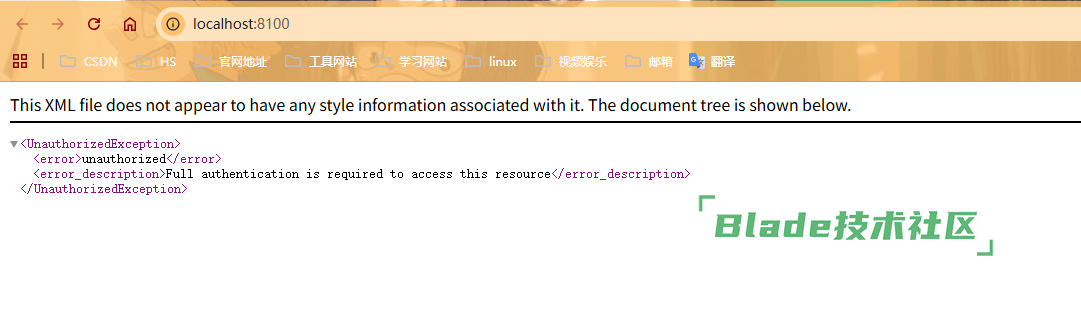
你直接访问当然不行,这是授权码模式的连接,要有对应参数才行的
你刚刚不都说登录成功了么?你同事怎么启动的你就怎么启动,如果你本地启动失败,就按照我上面发你的两个新的帖子地址去排查
扫一扫访问 Blade技术社区 移动端


 加载中...
 苏公网安备 32041102000998号