一、该问题的重现步骤是什么?
二、你期待的结果是什么?实际看到的又是什么?
1、没有找到有关流程插件的相关文档。
2、插件在页面调测中报跨域错误? 是否有什么推荐的方案解决该问题?
3、插件的返回值,如果我后台返回的是一个json对象,比如R<Map<String, Object>>,请问如何配置插件的返回值?
4、我期望的是能够直接返回值上去获取 body.data.inputUserMessage, body.data.hasNext
三、你正在使用的是什么产品,什么版本?在什么操作系统上?
4.8.0 bladeAI windows
四、请提供详细的错误堆栈信息,这很重要。
五、若有更多详细信息,请在下面提供。
1. 目前是一套简单操作跑通整个流程的文档:https://ai.bladex.cn/feature/app/application/operation-flow.html ,还没有给每个节点做详细解析的说明文档
2. 跨域的话,需要先解决外部接口本身的问题,让他解决掉跨域,一般是通过nginx配置来处理,可参考下面的配置
    location /api {

        # 隐藏后端返回的 CORS 头部
        proxy_hide_header 'Access-Control-Allow-Origin';
        proxy_hide_header 'Access-Control-Allow-Methods';
        proxy_hide_header 'Access-Control-Allow-Headers';
        proxy_hide_header 'Access-Control-Allow-Credentials';
        proxy_hide_header 'Access-Control-Expose-Headers';
        proxy_hide_header 'Access-Control-Max-Age';

        # 所有非OPTIONS请求的CORS头部
        add_header 'Access-Control-Allow-Origin' '*';
        add_header 'Access-Control-Allow-Methods' 'GET, POST, PUT, DELETE, OPTIONS' always;
        add_header 'Access-Control-Allow-Headers' 'DNT,X-Requested-With,Keep-Alive,User-Agent,X-Requested-With,If-Modified-Since,Cache-Control,Content-Type,Range,Authorization,token,Blade-Auth,Blade-Requested-With,Tenant-Id' always;
        add_header 'Access-Control-Allow-Credentials' 'true' always;
        add_header 'Access-Control-Expose-Headers' 'Content-Length,Content-Range' always;


        # 处理OPTIONS预检请求
        if ($request_method = 'OPTIONS') {
            add_header 'Access-Control-Allow-Origin' '*';
            add_header 'Access-Control-Allow-Methods' 'GET, POST, PUT, DELETE, OPTIONS' always;
            add_header 'Access-Control-Allow-Headers' 'DNT,X-Requested-With,Keep-Alive,User-Agent,X-Requested-With,If-Modified-Since,Cache-Control,Content-Type,Range,Authorization,token,Blade-Auth,Blade-Requested-With,Tenant-Id' always;
            add_header 'Access-Control-Max-Age' 3600;  # 预检请求的缓存时间
            add_header 'Content-Length' 0;
            add_header 'Content-Type' 'text/plain charset=UTF-8';
            return 204;  # 返回204响应,表示成功,但不返回数据
        }

        # 原来的代理配置
        proxy_redirect              off;
        proxy_set_header            Host $host;
        proxy_set_header            X-real-ip $remote_addr;
        proxy_set_header            X-Forwarded-For $proxy_add_x_forwarded_for;
        proxy_pass                  http://127.0.0.1:8800/;
    }
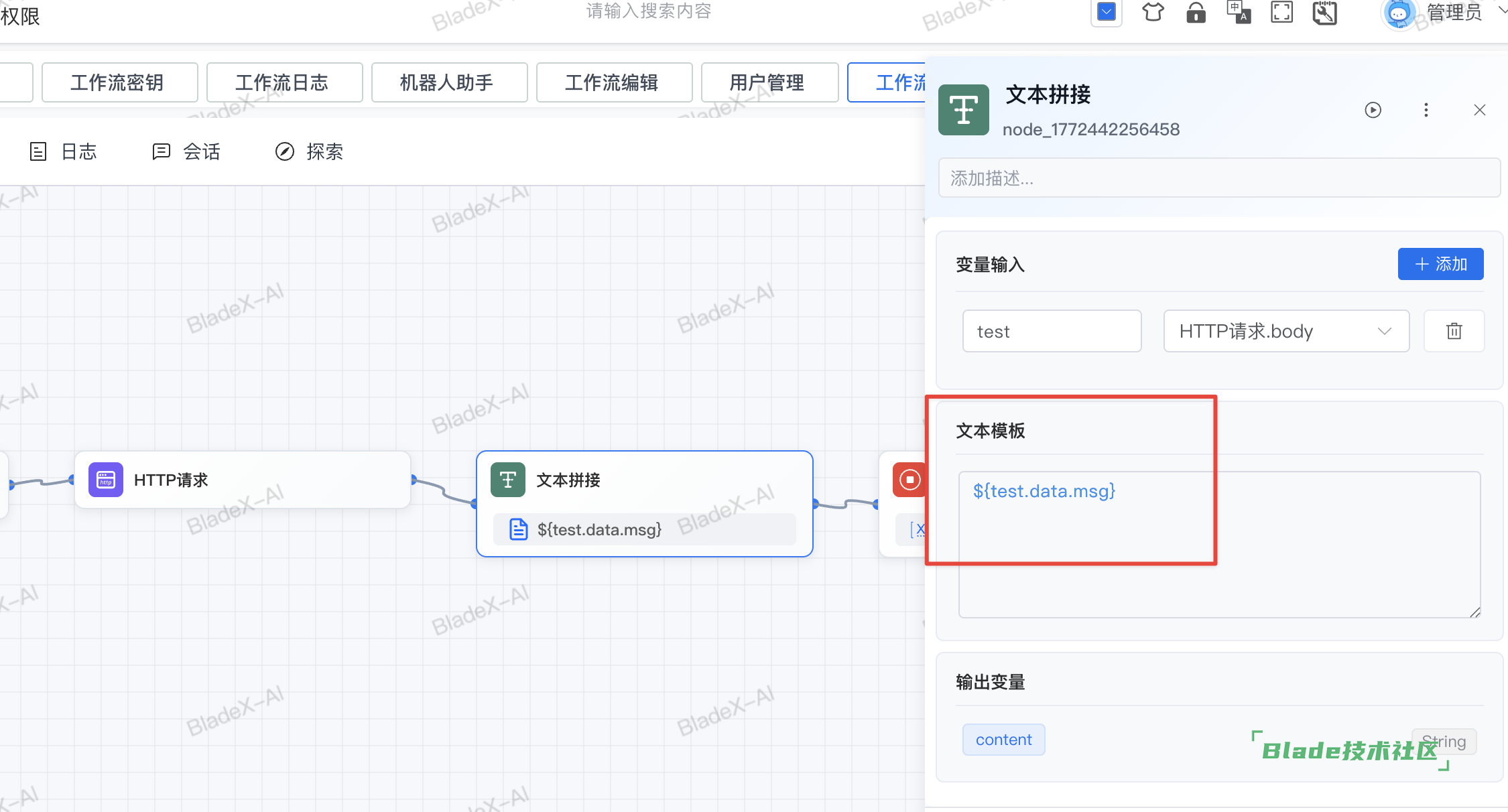
3. 这样的返回你测试是没有成功的么?把具体的配置发我们看下



 加载中...

 苏公网安备 32041102000998号